

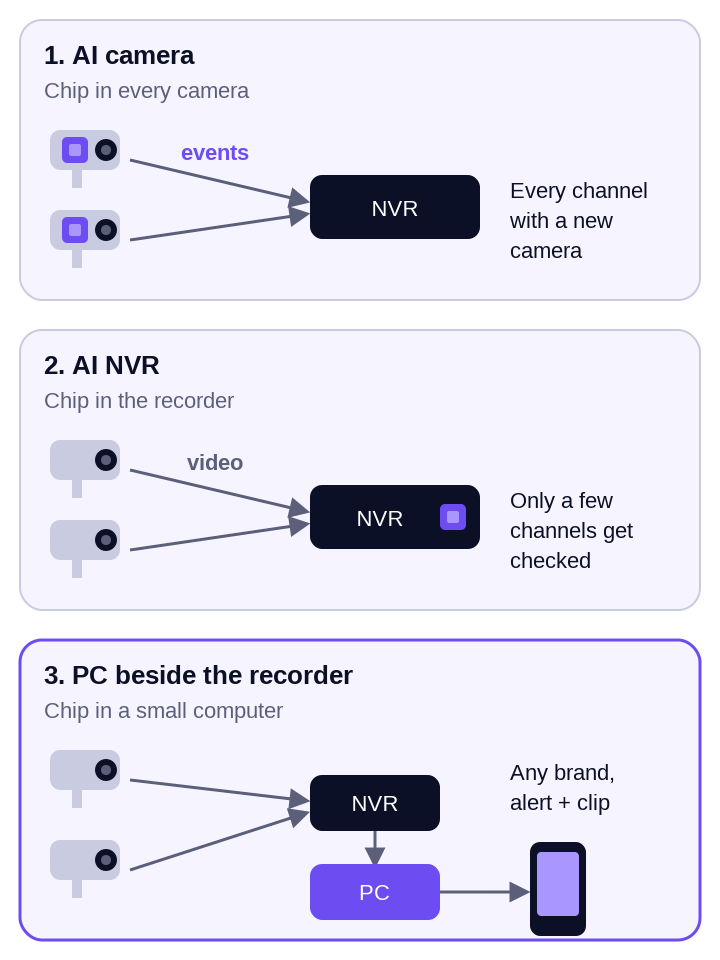
AI NVR vs AI camera comes down to where the detection runs. An AI camera checks its own picture, on every camera you buy. An AI NVR checks video in the recorder, but only on a few channels: one Hikvision 8-channel AcuSense NVR runs perimeter rules itself on 4 channels, at 2 MP. A PC beside the recorder is the third choice.
Most factories, warehouses and shops in India already have 8 to 32 cameras on a Hikvision, Dahua or CP Plus recorder. When a dealer offers "AI", the offer is usually one of two boxes: new AI cameras, or a new AI NVR. Both can work. Both also have limits that the brochure does not show. This guide explains what each one really does, how to read the datasheet line that decides it, and when the cheaper move is to keep everything and add a small computer.
What is the difference between an AI NVR and an AI camera?
An AI camera has a chip inside that runs detection on its own video, then sends events to the recorder. An AI NVR has the chip in the recorder, so it can check video from cameras that have no AI at all. A PC beside the recorder (often called an edge AI box) pulls the streams and does the checking in software.
| Question | AI camera | AI NVR | PC beside the recorder |
|---|---|---|---|
| Where the AI runs | In each camera | In the recorder | In a small computer on the same network |
| Need new cameras? | Yes, for each AI channel | No | No |
| How many channels get AI | Every AI camera | A few, set by the datasheet | As many as the PC can handle |
| Mixed brands | Events may not reach another brand's NVR | AI often works best with its own brand | Works with any RTSP or ONVIF stream |
| Changing the rules later | Limited to what the camera firmware offers | Limited to the NVR firmware | Software can change |
| Extra box to look after | No | No | Yes, it needs power backup |
How many cameras can an AI NVR analyse? Read the datasheet
Far fewer than it records. The number you want sits on the line called "AI by NVR" or "By NVR". "By camera: all channels" only means the NVR will show events from cameras that already have AI.
Take Hikvision's datasheet for the DS-7608NXI-I2/8P/S, an 8-channel AcuSense 4K NVR. It records 8 IP cameras. Its own analysis is much smaller:
| Datasheet line | What it says | What it means on site |
|---|---|---|
| Perimeter protection, by NVR | 4-ch, 2 MP, up to 12 rules | Only 4 of your 8 cameras get the NVR's human and vehicle check, at 2 MP |
| Perimeter protection, by camera | All channels | The rest need cameras that do the check themselves |
| Face capture, by NVR | 4-ch | Same limit for faces |
| Motion detection 2.0, by NVR | All channels for Hikvision cameras | Other brands do not get this filter |
| Decoding with AI by NVR on | 20-ch at 1080p, against 32-ch with it off | Turning AI on uses up the box's power for playback too |
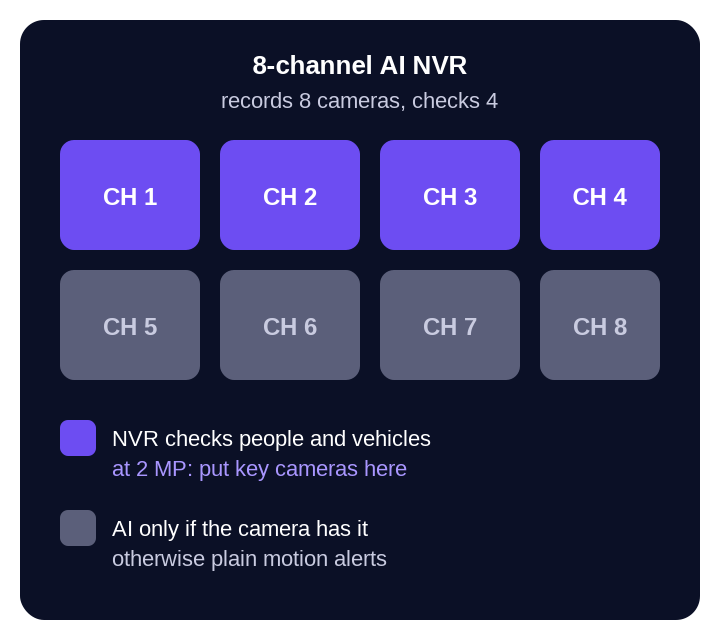
Other models and brands have different numbers, and larger models may check more channels. The point is to ask for the datasheet and read that one line before you buy. If the dealer cannot show it, assume the AI covers fewer cameras than you think.
AI NVR vs AI camera vs edge AI box: which one fits?
Use the camera you have, not the one in the brochure, to decide. Start from four questions: are the cameras IP or analog, one brand or mixed, how many need AI, and do you need rules the recorder does not offer?
| Your site | Best fit | Why |
|---|---|---|
| New building, no cameras yet | AI cameras with a matching NVR | Every channel gets AI and you buy cameras anyway |
| One brand, IP cameras, 2 to 4 key spots | AI NVR of the same brand | Put the key cameras on its AI channels and keep the rest |
| Mixed brands or old analog cameras on a DVR | PC beside the recorder | An NVR cannot take analog cameras, and AI across brands is patchy |
| 10 or more cameras that need checking | PC beside the recorder, or AI cameras for the worst spots | NVR AI channels run out fast |
| Rules like "helmet in this zone" or "door open after 8 PM" | PC beside the recorder | Most recorders offer fixed rules: line cross, intrusion, face |
A note on analog. Many older sites run analog cameras on a DVR, and an AI NVR cannot record them. Before you plan any upgrade, check which cameras give a usable stream; our readiness check for adding AI to existing CCTV covers RTSP, ONVIF and pixels per metre camera by camera.
Will an AI NVR work with other brand cameras?
It will record them. The AI usually will not follow. The same Hikvision datasheet lists motion detection 2.0 by NVR for "all channels for Hikvision cameras", which leaves a CP Plus or Dahua camera on that box with plain motion detection.
Smart events from a camera of another brand travel over ONVIF Profile M, the ONVIF profile for analytics metadata and events. Both the camera and the NVR must support it, and many budget models do not. Ask the dealer to show a line-cross event from your actual camera arriving on the new NVR. A demo with their own brand of camera proves nothing about yours.
This matters for factories most. Plants grow in stages, so a gate camera from 2018, a dock camera from 2021 and a new store camera from another brand on one recorder is normal.
A worked example: 16 cameras at a warehouse
The figures here are illustrative, not from a real site. A warehouse has 16 IP cameras from two brands on a 16-channel NVR. The manager wants AI on 6 of them: the main gate, two dock doors, the store room and two yard corners.
| Option | What changes | Cameras covered by AI | Watch out for |
|---|---|---|---|
| Replace 6 cameras with AI cameras | 6 new cameras, same NVR | 6, if the NVR shows their events | Old NVR may not read events from a new brand |
| New AI NVR | New recorder, same cameras | Only as many as its "by NVR" line allows, often fewer than 6 on a small model | Other brand cameras may lose filters |
| PC beside the recorder | One mini PC, same cameras and NVR | 6, using sub-streams | Needs a UPS and someone to check it runs |
The PC reads each camera's sub-stream, the small second stream every IP camera sends for phone viewing, so 6 of them add little load to the site network. Full recordings stay on the NVR. Only alerts and short clips need to leave the site, a point our pillar post covers with Hikvision's bitrate table.
For the money side, our guide to what AI CCTV analytics costs in India breaks a quote into five lines, with a three-year sum for per-camera and per-site plans.
Where each option goes wrong
Every option fails in its own way, and none fixes a bad camera angle.
- AI cameras: You pay per camera, and the AI is only as good as that camera's firmware. When you want a new rule in two years, the camera may never get it.
- AI NVR: The AI channels run out. Owners find out after install that the yard cameras, the ones they cared about, sit on channels 5 to 8 with no check.
- Brand lock: A smart NVR with mixed cameras often behaves like a plain NVR on the cameras that matter.
- PC beside the recorder: It is one more box. If it sits on the floor of a dusty store room with no UPS, it will stop during the first power cut.
- All of them: Night images, glare from dock lights and cameras mounted too high cause more false alarms than any chip choice. Our PPE detection guide shows how many pixels a helmet check needs, and the same rule applies to people and vehicles.
Run a one-week test on your own footage before you sign. Count the alerts, count how many were real, and keep the sheet.
Where Camryx fits
Camryx is our AI for the CCTV a business already has. It is the "PC beside the recorder" option. A small site agent on a PC or mini PC finds the cameras on the network and connects out over HTTPS, with no port forwarding. It works with Hikvision, Dahua, CP Plus and any RTSP or ONVIF camera, so mixed brands are fine. You write alert rules in plain words, each alert is checked by vision AI before it is sent, and full recordings stay on your recorder. There is no face recognition. Camryx is in early access, so there are no site accuracy figures yet. See how Camryx works with your cameras, or read how to search CCTV footage quickly with the tools your recorder already has.
Frequently asked questions
Is an AI NVR better than AI cameras?
Neither is better everywhere. AI cameras check every channel but cost money per camera and lock you to what each camera can run. An AI NVR keeps your cameras but usually analyses only a few channels itself. Read the AI by NVR line in the datasheet: one popular 8-channel model checks 4 channels, at 2 MP, for perimeter rules.
Can an AI NVR add AI to my old non-AI cameras?
Partly. The NVR can run its own human and vehicle check on a few channels at a capped resolution. On the 8-channel Hikvision model in this guide, that is 4 channels at 2 MP. The other channels only get AI events if the camera sends them. Pick your most important cameras for the NVR's AI channels.
Will a Hikvision AI NVR work with CP Plus or Dahua cameras?
It will record them over ONVIF. The AI is another matter. Hikvision's own datasheet for one AcuSense NVR lists its motion detection 2.0 for all channels of Hikvision cameras only. Smart events from other brands depend on ONVIF Profile M support on both sides, so ask to see it working before you pay.
Do I need AI cameras for PPE or helmet detection?
Not always. PPE checks need enough pixels on the worker more than a chip in the camera. A normal camera at the right height and distance, read by a PC beside the recorder or an AI NVR channel, can do it. Test a week of footage first.
What is an edge AI box for CCTV?
It is a small computer, often a mini PC, that sits on the same network as your recorder. It pulls video streams from the cameras or the recorder over RTSP, runs the detection itself and sends alerts with a clip. It works with mixed brands and is the usual way to add AI without replacing anything.
Add AI without replacing cameras
Camryx runs a small agent on a PC beside your recorder and works with the cameras you already have. Now in early access.