


Tally is accounting software. It records money, GST and stock vouchers very well. A manufacturing ERP runs the work behind the money: purchase approvals, production planning, stock by batch across plants, and dispatch. A plant has outgrown TallyPrime when that work lives in Excel and WhatsApp beside it, not when turnover crosses a number.
That last line matters. A trader with large sales and simple stock can run well on Tally for years. A smaller plant with two units and a weighbridge can struggle much sooner. This post is fair to Tally first. Then it gives seven signs with a test for each, a rough ₹ cost of staying, and a table of what to keep in Tally while you move. If you are still on sheets alone, read our ERP vs spreadsheets guide first.
What is the difference between Tally and an ERP?
Tally records what happened. An ERP also plans and controls what happens next. Both keep accounts and stock, so the overlap is real. The difference is where the first entry is made.
| Question | TallyPrime | Manufacturing ERP |
|---|---|---|
| Built around | Vouchers and ledgers | Orders, stock and production |
| First entry made by | Accounts team | Gate, stores, production, sales |
| Production | Records it after the fact (Manufacturing Journal) | Plans it, issues material, tracks it by shift |
| Stock | By godown and batch, from vouchers | By location and batch, live from each movement |
| Best fit | Traders, single plants, simple BOMs | Many plants, deep BOMs, batch tracing |
Tally Solutions does call TallyPrime business management and ERP software for manufacturing. That is fair for a small plant. The useful test is not the label. It is whether your plant data starts in Tally, or starts somewhere else and gets typed into Tally later.
What does TallyPrime do well today?
TallyPrime is strong at Indian compliance and everyday accounts, and it does more manufacturing than most ERP vendors admit. Before you leave it, know what you would give up. Everything below is from Tally's own help pages.
- GST, e-invoice and e-way bill. TallyPrime can generate the IRN and QR code when you save an invoice, and create the e-way bill from the same voucher.
- Bills of materials. You define a BOM on the stock item. The Manufacturing Journal then fills in the components and works out the cost per unit.
- Work in progress. Tally's own guide to production and WIP tracking uses a "shop floor" godown, stock journals and job costing.
- Job work. Material sent to and received from job workers has its own job work vouchers.
- Batches and godowns. Stock can be kept by batch and by godown, with a godown summary for each.
- Edit log. The TallyPrime Edit Log records who created, changed or deleted a voucher or master.
Tally also has limits that its own help pages mention. You cannot print a BOM from the stock item screen. When an item is kept in batches, its quantity is not filled in for you in the Manufacturing Journal. These are small. The bigger limits come from how a plant works, not from missing menus.
Where does Tally start to strain in a factory?
Tally strains when many people in many places need to make the first entry. It is built for an accounts team to post vouchers. A plant has a gate, a weighbridge, stores, a shop floor and a dispatch bay. Each makes records all day.
Production that is planned somewhere else
Tally records what was made. It does not tell you what to make tomorrow, what material that needs, or what to buy for it. So production planning sits in Excel. Every change to the plan has to be copied by hand.
Stock moving between plants and godowns
Tally's godowns hold stock well. But every transfer is a voucher typed by someone. With two plants and daily truck movements, the physical stock and the Tally stock drift apart. They meet again at month end, after someone matches them.
Users at many sites
A Gold licence is built for many users on one local network. For users at other sites, Tally's remote access FAQ lists 10 concurrent users per Gold licence. Plants with stores, gate and dispatch teams at three locations hit that limit, or they send sheets to head office instead.
What are the signs you have outgrown Tally?
Two or more of the signs below mean it is time to look at an ERP. One sign alone can often be fixed inside Tally. The tests are our rules of thumb from plant work, not an industry standard.
| Sign | Test |
|---|---|
| 1. Stock moves between sites every day | Tally stock matches the floor only after month-end matching |
| 2. Production is planned in Excel | More than one BOM level, or BOMs change every month |
| 3. Batch tracing is slow | Tracing a complaint back to the raw material lot takes over an hour |
| 4. Approvals live on WhatsApp | Purchase orders are typed into Tally after the approval |
| 5. Gate weights are typed by hand | Weighbridge slips are re-keyed into receipts or invoices |
| 6. Many sites need to enter data | People at three or more sites post entries daily |
| 7. Month end is slow | Closing takes more than five working days because stores, production and accounts disagree |
Sign 5 is often the cheapest to fix first. Our guide to weighbridge integration with an ERP shows what the link does. Sign 1 gets worse with every plant you add. The multi-plant ERP guide covers that case.
What does staying on Tally cost you?
The clerk's time is the smallest cost. The bigger cost is late and wrong numbers. Here is an illustrative example with assumed inputs. It is not a customer's figure.
Take a plant with two units and three godowns. Assume 240 stock transfers a month. Each is noted in a register, then typed into Tally and matched, at about 6 minutes each. That is 24 hours a month. Month-end matching takes two people three days, which adds 48 hours. At about ₹250 an hour with overheads, the 72 hours cost ₹18,000 a month, or about ₹2.2 lakh a year.
That alone rarely pays for an ERP. Two other costs usually do:
- Late invoices. From 1 April 2025, a business with aggregate turnover of ₹10 crore or more must report each e-invoice to the IRP within 30 days of the invoice date (GSTN advisory, 2024). If dispatch is noted in a plant register and keyed into Tally weeks later, the portal can refuse it. Our GST e-invoicing guide covers the rules in full.
- Stock you cannot see. A wrong stock figure leads to an urgent purchase or a missed order. One rush purchase of a costly spare can cost more than a year of clerk time.
What should stay in Tally, and what should move?
Move the plant records first and keep the books in Tally until the new system has earned trust. The rule is simple: one system owns each record, and entries flow one way.
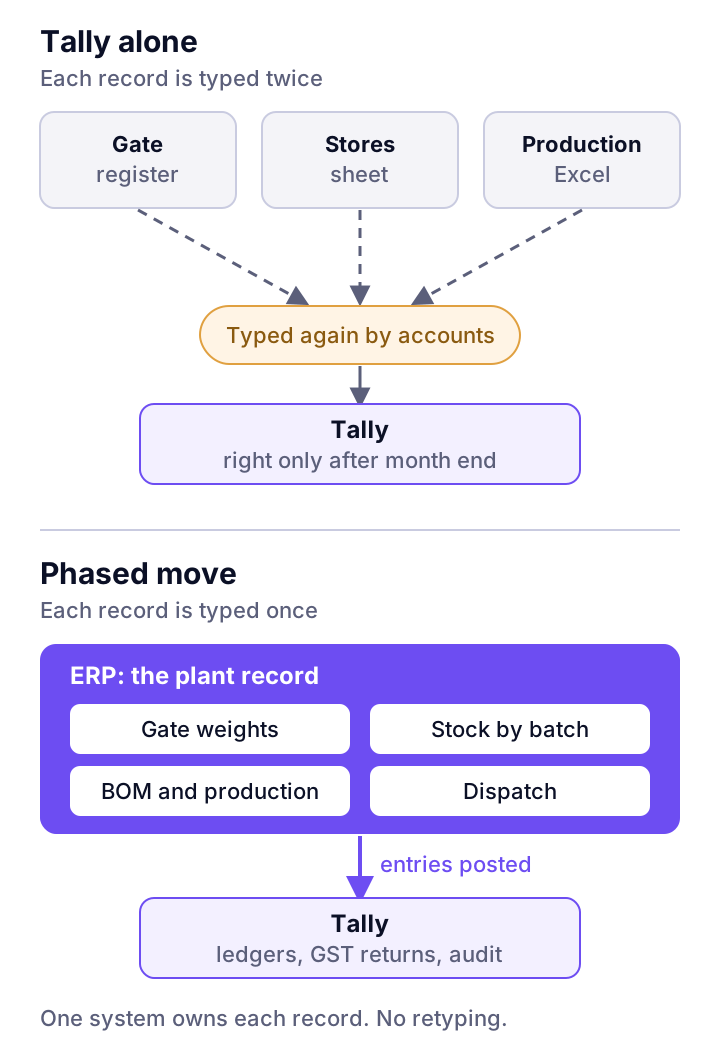
| Record | First phase | Later |
|---|---|---|
| Ledgers, GST returns, TDS, statutory audit | Keep in Tally | Move when the ERP's books have closed a few months cleanly |
| Purchase requests, approvals, purchase orders | Move to the ERP | |
| Gate entry and weighbridge weights | Move to the ERP | |
| BOM, production plans, material issue | Move to the ERP | |
| Stock by batch and location | Move to the ERP; post summary entries to Tally | |
| Sales invoice, e-invoice, e-way bill | Whichever system raises the invoice | Usually the ERP, once dispatch is in it |
Keep Tally's edit log in mind while you run both. Since financial years starting on 1 April 2023, Indian companies must use accounting software with an audit trail that cannot be disabled, under the Companies (Accounts) Rules, 2014. Tally's Edit Log covers Tally. Side sheets in Excel have no such log. Moving those sheets into an ERP with its own audit log helps your auditor too.
Our ERP migration checklist lists the data to clean before the move.
Where does this go wrong?
Most failed moves away from Tally fail on people and data, not software. Watch for these:
- Moving everything at once. Accounts, stock and production on the same go-live day means three problems at once. Move one module, close a month, then move the next.
- Two masters for one record. If stores can edit stock in the ERP and accounts can edit it in Tally, you now have two wrong numbers instead of one.
- Dirty item masters. The same bearing under four names in Tally becomes four items in the ERP. Clean the item list first.
- Ignoring the accounts team. They know Tally deeply. Bring them in early and keep the books in Tally until they trust the new numbers.
- Buying an ERP you do not need. A single-plant trader with simple stock is often better off on Tally with good discipline.
Where ZapNexa fits
ZapNexa is our manufacturing ERP. It covers production and MRP, stock across warehouses with batch and serial control, GST-ready invoicing, weighbridge integration, approval workflows and consolidation across plants. Most clients move one module at a time, and some run Tally alongside it during the move. Pricing is quoted per configuration of modules, plants and users. The ZapNexa vs Tally comparison sets the two side by side, and the ZapNexa ERP guide explains how it is built.
Frequently asked questions
Is Tally an ERP?
Tally Solutions markets TallyPrime as business management and ERP software, and it does cover accounts, GST, inventory and basic manufacturing. In practice it is accounting first. It records what happened as vouchers. A manufacturing ERP also plans and runs the work: purchase approvals, production orders, material planning and stock by batch across plants. So the honest answer is that Tally is an accounting-first ERP for small and mid-sized firms.
Can I run Tally and an ERP together?
Yes, and many plants do during a move. The rule is that one system owns each record. The ERP owns gate entries, stock, production and dispatch. Tally keeps the ledgers, GST returns and statutory audit until you are ready to move them. Entries flow one way, from the ERP into Tally, so nobody types the same invoice twice.
Does Tally handle manufacturing and bills of materials?
Yes, at the recording level. TallyPrime has bills of materials, a Manufacturing Journal that consumes components and builds the finished item, job work vouchers, batches and godowns, which can also track work in progress. What it does not aim to do is plan production: material requirements, production orders by shift and shop-floor control are ERP work.
How many users can work in Tally at the same time?
A TallyPrime Silver licence is for one user. A Gold licence lets many users work on the same data over a local network. For remote access, Tally's own FAQ lists one user per Silver licence and 10 concurrent users per Gold licence. Limits change between releases, so check the current figure with Tally before you plan.
Is Tally's edit log enough for the audit trail rule?
The audit trail rule applies to the accounting software a company uses. TallyPrime Edit Log records the creation, change and deletion of vouchers and masters, and the log cannot be switched off in that release. The gap is usually outside Tally: production and stock kept in Excel have no edit log at all. Ask your auditor how they treat those side records.
Estimate the payback before you switch
Put in your plants, users and the hours spent re-keying and reconciling, and see what a manufacturing ERP would pay back.