


An ERP implementation timeline for one Indian plant usually runs six to nine months, from kick-off to a stable first month-end close. One 2026 phase plan for mid-size manufacturers uses 36 weeks. Master data cleanup, your key users' time and the go-live date you pick decide where you land.
Most timeline guides online are written for US or global companies. They never mention the March close, GST returns or a move from Tally. This guide gives you an illustrative 36-week plan with real dates, a go-live month table for Indian plants, the GST rules that affect cutover, and a checklist you can use this week.
How long does ERP implementation take?
It depends on scope more than on the software. A plant that moves only finance and stores is a smaller job than one that also moves production, quality and dispatch. Each extra plant, GSTIN or machine link adds weeks.
The ranges below are our planning ranges for Indian manufacturers. They are illustrative, not a promise from any vendor. Use them to test whether a quote is honest.
| Scope | Planning range | What drives the time |
|---|---|---|
| One plant, finance and stores only | 3–4 months | Ledger cleanup, item codes, opening stock |
| One plant, full factory (purchase, stores, production, quality, dispatch, finance) | 6–9 months | BOMs and routings, testing on a real month, training shift staff |
| 2–4 plants under one company | 9–12 months | First plant first, then each extra plant as its own small rollout |
| Group of companies with machine data links | 12–18 months | Several GSTINs and books, consolidation, PLC or weighbridge links |
If a vendor promises a full factory in six weeks, ask what is left out. Usually it is BOMs, costing or testing. If a quote says 18 months for one plant, ask which phase holds the extra time. Our ERP implementation checklist covers what to settle before any of these phases start.
ERP implementation phases, week by week
Here is an illustrative plan for one plant moving from Tally and Excel to a full factory ERP. It starts on Monday 7 December and goes live on 1 July. Phases overlap on purpose, because data cleanup can start before setup is finished.
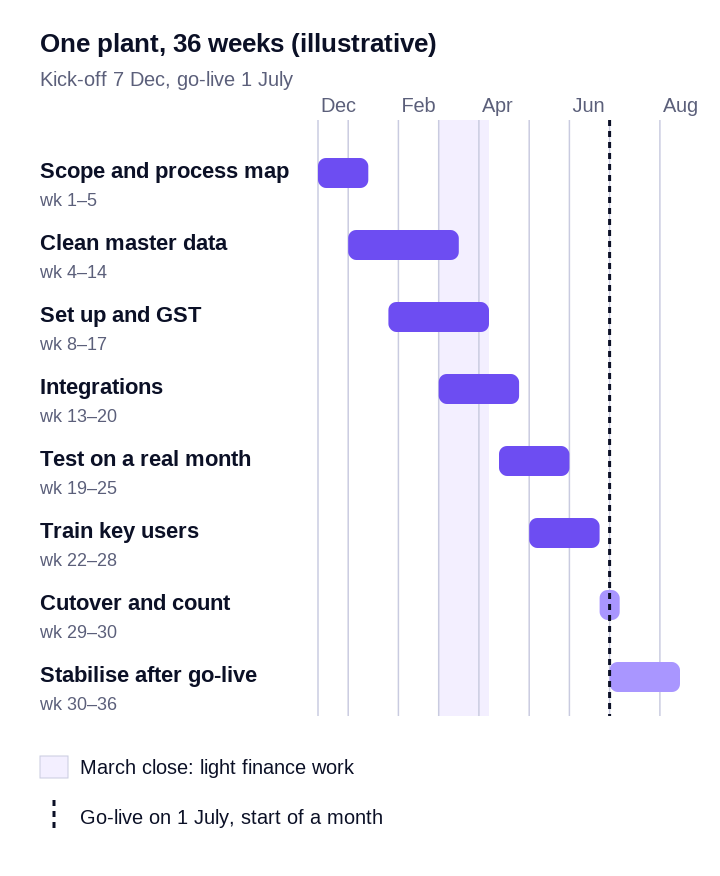
| Weeks | Phase | Done when | Who signs off |
|---|---|---|---|
| 1–5 | Scope and process map | Each process (purchase to pay, order to cash, issue to production) is drawn on one page, with the forms and reports it needs | Owner or CFO |
| 4–14 | Clean master data | One code per item, vendors with valid GSTINs, BOMs that match how the shop floor really makes the product | Stores head, production head |
| 8–17 | Set up and GST | Company, plants, godowns, tax codes, number series, approval rules, e-invoice and e-way bill links tested | Accounts head |
| 13–20 | Integrations | Weighbridge, bank statement import, any Tally bridge, label printers | IT head |
| 19–25 | Test on a real month | A closed month (for example April) replayed in the new system; trial balance, stock value and GSTR-1 match the old books | CFO and auditor's contact |
| 22–28 | Train key users | Each user has done their own daily entries in the test system, not just watched a demo | Department heads |
| 29–30 | Cutover and count | Physical stock counted on 30 June, open orders and bills loaded, old system closed for new entries | Owner, accounts, stores |
| 30–36 | Stabilise after go-live | First month-end close and first GST return from the new system done | CFO |
Two rules keep this plan honest. First, the test month must be a real closed month with real invoices, not made-up data. Second, nobody trains on screens they will not use. A stores clerk needs issue slips and receipts, not the finance menu.
Why the test phase sits after March
The plan puts testing in April and May on purpose. March is the year-end close in India. Accounts staff are busy with closing entries, the stock count and audit queries. Asking them to also test a new ERP in March is the fastest way to lose a month.
When should an Indian manufacturer go live?
Go live on the first day of a month, never in the middle. A month start gives you a clean cutoff for stock, open bills and GST returns. Which month you choose matters too.
| Go-live date | What works | What to watch |
|---|---|---|
| 1 April | New financial year in one system from day one | Year-end close, stock count and the new system all land in the same weeks. Audited closing figures often come months later, so opening balances may change after go-live |
| 1 July | Year-end work is mostly behind the accounts team | Opening balances are mid-year: load a trial balance, open bills and counted stock as on 30 June |
| 1 October | Six months to settle before the next March close | Many plants dispatch more before the festive season. Do not train dispatch staff during their busiest weeks |
| 1 January | Three months to prove the system before March | Little room for delay. A slip of one month pushes stabilising into the year-end close |
Many owners want 1 April because it feels clean. It can work, but only if the year-end close and the stock count are planned as part of the cutover, with extra hands. If your team is small, 1 July is often the calmer choice.
GST rules that shape the cutover
Three GST rules decide how careful the cutover must be.
- Invoice number series. Under Rule 46(b) of the CGST Rules, invoice serial numbers must be unique for a financial year. If you go live mid-year, give the new system a prefix that cannot repeat a number Tally already used.
- E-invoice time limit. From 1 April 2025, a business with aggregate turnover of ₹10 crore or more cannot report an e-invoice to the IRP more than 30 days after the invoice date (GSTN advisory). Keep e-invoicing working every day of the cutover. Do not plan to "enter the gap later".
- GSTR-3B liability is locked. From the July 2025 tax period, the tax liability that GSTR-3B fills in from GSTR-1 or IFF cannot be edited. Corrections go through GSTR-1A before you file GSTR-3B (GSTN advisory). So in the first month, check the new system's GSTR-1 against the sales register line by line before you file.
Our GST e-invoicing guide for manufacturers explains what the ERP itself must handle. Confirm the treatment for your own business with your CA.
What a slipped month costs: an illustrative example
A late go-live is not free, even if no new invoice arrives. The figures below are illustrative, for a plant running Tally and a new ERP side by side.
Say two accounts staff enter each bill in both systems during the parallel run. That adds about 3 hours a day each. At 26 working days and about ₹250 an hour with overheads, the double entry costs:
2 people × 3 hours × 26 days × ₹250 = ₹39,000 a month.
A two-month slip doubles that to ₹78,000, before you count the software fees already running and the benefits you have not yet got. That is why one month of parallel running is usually enough. Run both systems through one month-end close, compare trial balance, stock value and GSTR-1, fix the gaps, then switch Tally to read-only. Our Tally vs ERP guide explains which parts can stay in Tally for a while.
Where ERP timelines slip in Indian plants
Most delays come from the plant's side, not the software's. Here are the ones we see most often, with the fix.
- One item, four names. The same bearing sits in stores as "6205 brg", "Bearing 6205 ZZ" and two other codes. Fix: freeze new item creation in week 4 and clean the list before you load it.
- BOMs live in one person's head. The production head knows the real mix, but the written BOM is two years old. Fix: rebuild BOMs from the last three months of actual issues, then get them signed.
- Key users have no spare time. The best stores clerk is also the busiest. Fix: free each key user for a fixed half day every week, in writing, from the owner.
- Too many changes to the standard product. Every custom report or screen adds testing time. Fix: go live on standard forms and keep a "later" list for after the first close.
- Stock that never matches. If the book stock and the count were far apart in Tally, the gap moves into the new system. Fix: trace the gap first with our guide to physical stock vs book stock.
- Integrations started late. A weighbridge or bank link found in week 25 pushes go-live. Fix: list every outside system in week 2. See weighbridge integration with ERP for what that link needs.
- All modules on one day. Accounts, stock and production going live together means three problems at once. Fix: stagger them, or start with one plant, as our multi-plant ERP guide suggests.
There are limits to any plan. A plant with poor data and no free staff will not hit six months, whatever the vendor says. It is better to plan nine months and keep the date than plan six and miss it twice.
ERP implementation plan checklist you can use this week
Use this before you sign, or to check a plan you already have.
- Write the scope as a list of processes, not modules: purchase to pay, order to cash, issue to production, stock transfer, month-end close.
- Count your item codes, vendors, customers and BOMs. Note how many are duplicates or out of date.
- Name one key user per department and agree their weekly hours in writing.
- Pick a go-live date on the first of a month, and mark March, your festive peak and your annual shutdown on the plan.
- List every outside system: weighbridge, bank, e-invoice and e-way bill portals, label printers, Tally.
- Choose the closed month you will replay for testing, and keep its invoices and GSTR-1 ready.
- Agree the go-live test in advance: trial balance, stock value and GSTR-1 must match within a stated limit.
- Plan the stock count for the day before go-live, with extra people.
- Plan one month of parallel running, not more, and a date to make the old system read-only.
- Book support for at least four to six weeks after go-live, through the first month-end close and GST return.
For the cost side of the same decision, see our guide to ERP software price in India. For the wider picture of what a factory ERP covers, read our manufacturing ERP guide.
Where ZapNexa fits
ZapNexa is our manufacturing ERP for Indian factories. It suits a phased plan like the one above. Masters and opening balances import from CSV, Excel or Tally, so you do not start from a blank screen. Most clients move one module at a time, starting with whichever is causing the most pain. Some keep Tally running during the move, and ZapNexa can export a period back to Tally. We do not quote a fixed timeline, because it depends on your scope and data.
Frequently asked questions
How long does an ERP implementation take for a manufacturer?
For one plant with standard processes, plan about six to nine months from kick-off to a stable first month-end close. Finance and stock alone can take three to four months. Several plants, several GSTINs or machine data links add months. Data cleanup and the time your own key users can give decide the date more than the software does.
Can we go live on an ERP in the middle of the financial year?
Yes. Go live on the first day of a month, bring in a trial balance, open bills and a counted stock as on the last day of the previous month, and keep your old books for the months before. Under GST, choose an invoice number series that does not repeat any number already used in that financial year.
How long should we run Tally and the new ERP in parallel?
One full month is usually enough, and two at most. Run both for one month-end close, compare the trial balance, stock value and GSTR-1 figures, and fix the gaps. Longer parallel runs tire the accounts team and people start to trust neither system.
What is hypercare after ERP go-live?
Hypercare is the support period right after go-live, when the implementation team stays close to users and fixes problems the same day. For a manufacturer, it should last at least until the first month-end close and the first GST return from the new system are done, which is about four to six weeks.
Plan your rollout with real numbers
Estimate what an ERP is worth to your plant before you fix a go-live date, then compare it with the cost of a slipped month.